dsh-at-file
Codex-style @ file mentions — search the workspace in the composer and attach paths, not full content
Install
dsh plugin --profile web add github:omdsh-dev/dsh-at-file Screenshots 2
dsh-at-file
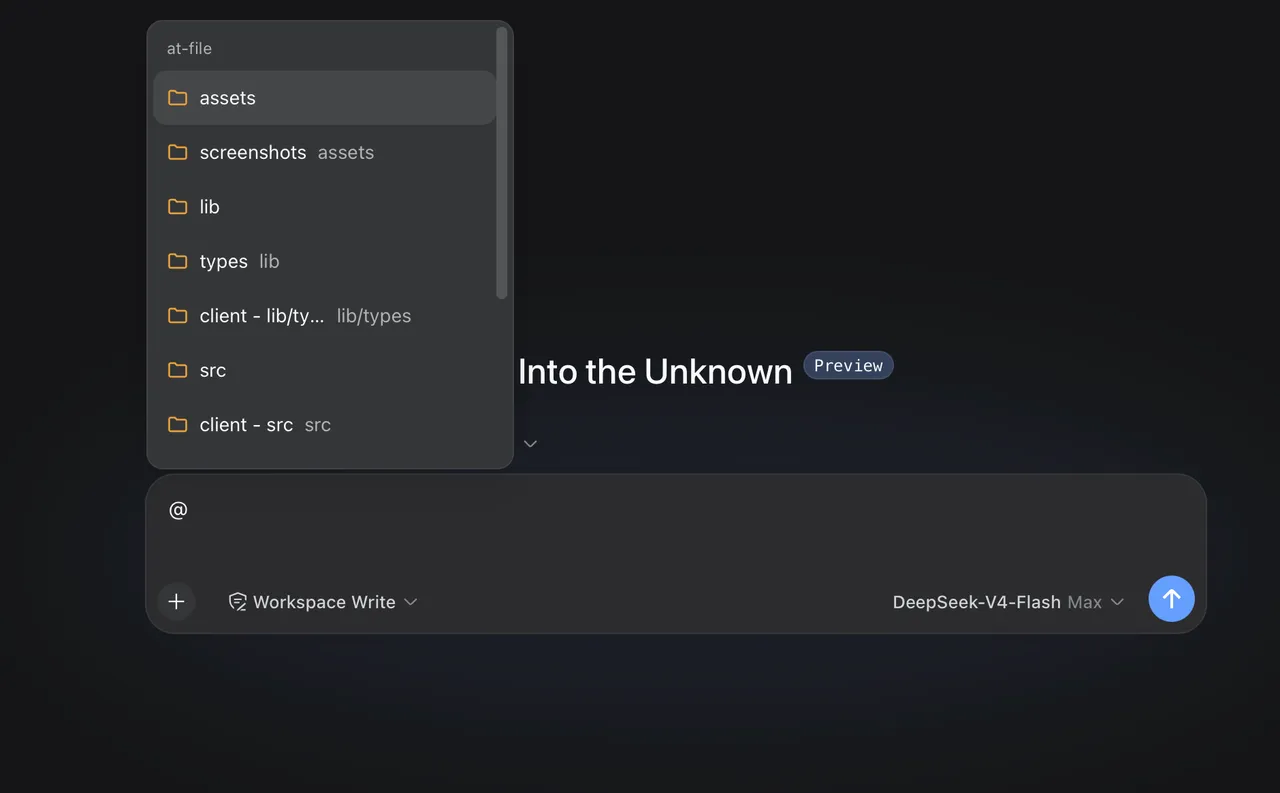
No pasting full files, no typing long paths: hit
@in the composer to search the workspace, attach a path, and let the agent read it on demand.
What problem it solves
Pointing an agent at a file usually means either pasting the whole content or typing a path by hand — one bloats context, the other invites typos. This plugin brings Codex-style @ mentions to DeepSeek Harness Web: type @ in the composer to search the current workspace and insert a file or directory path, which stays visible in the draft and can be opened or removed from the reference bar.
The key is “reference the path, not the content”: before the agent starts a step, the plugin confirms the path exists inside the active workspace, then adds a short <workspace-reference path="docs/spec.pdf" kind="file" /> marker instead of dumping the file into the prompt. The agent inspects the path with the tools in the current session when the task needs it. PDFs and images follow the exact same reference flow as any other file.
Key features
@path picker: plain queries rank exact/prefix/compact filename matches;/-containing queries match path segments; arrow into directories- Reference-bar draft: the selected path stays in the draft and can be opened or removed; Enter and pointer selection finish a directory reference
- No content dump: only a
<workspace-reference>marker is injected — the plugin never opens the file or lists directory contents; the agent reads on demand - Pasted text stays text: an
@pathcopied from elsewhere doesn’t open the picker or enter the reference bar; turn off “Ignore @ mentions in pasted text” in Settings → File mentions to change that - Smart index skips: VCS dirs, IDE metadata, dependency trees, caches, and build output, plus OS files like
desktop.ini/.DS_Store, are excluded by default - File filters: global and per-workspace, Exact / Regex matching with optional case-sensitivity; invalid regex is flagged before saving
- Configurable:
maxIndexedFilesandignoreDirsincordis.patch.yml
Quick start
Install:
dsh plugin --profile web add https://github.com/omdsh-dev/dsh-at-file/archive/refs/tags/v0.6.5.tar.gzRestart dsh web afterwards. Then type @ in the composer to search and pick a file, for example:
Review @docs/spec.pdfManage file filters under Settings → File mentions. To raise the index cap or exclude directories, add to your profile’s cordis.patch.yml:
- id: dsh-at-file
  config:
    maxIndexedFiles: 10000
Who it is for
- Developers who frequently point the agent at specific files — especially PDFs and images that shouldn’t be dumped wholesale
- Heavy DSH users who want a cleaner context and more precise references
- Anyone tired of typing long paths and polluting the prompt
Compiled from the project README · All rights belong to the original author
Report issue / Request removal