dsh-context
dsh-context: Context tab and /context command to visualize context composition and evolution for DSH developers.
Install
dsh plugin --profile web add dsh-context Screenshots 5
dsh-context
Stop treating the context window as a black box: one Context tab plus
/contextshows what’s in the window and what’s eating it.
What problem it solves
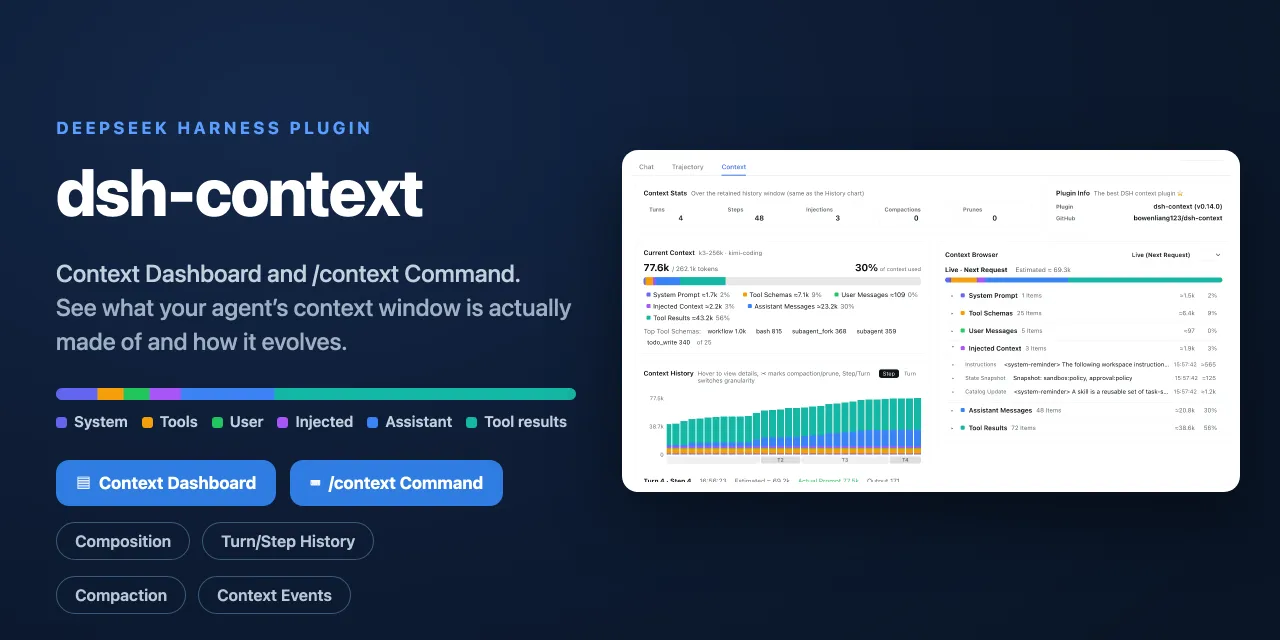
What’s eating your context window, and when was it compacted or pruned, has always been guesswork. This plugin brings full context lifecycle management: the Context tab is a dashboard for DSH context stats, composition, history, events, and messages — turns, steps, injections, compactions, and prunes at a glance — while the /context command opens an in-session modal for the current composition and recent evolution.
The composition view is a six-color stacked bar scaled against the model’s full context window (the gray track is your remaining headroom): system prompt, tool schemas, your messages, injected context, assistant replies, and tool results — plus the top-5 most expensive tool schemas — so when a conversation starts degrading you can see exactly which part ate the budget. History renders one stacked bar per model request with Turn/Step granularity, side-scrolling, and ✂ markers where compaction or pruning happened.
Key features
- Context tab: a five-in-one dashboard for stats, composition, history, events, and messages
/contextcommand: a centered in-session modal with the current composition card and the context browser — no need to leave the chat- Six-color composition bar: scaled against the full window (gray track = headroom) plus the top-5 most expensive tool schemas
- History view: one stacked bar per model request, Turn/Step granularity, hover for a tooltip and click to pin the full breakdown (including provider-reported tokens)
- Context events: every compaction, tool-output prune, skill/plugin injection, and model switch with token deltas, filterable by Inject / Compact / Prune / Switch
- Context browser: pick Live or any retained step and expand each category into the actual content — full system prompt, tool schemas, messages, reasoning, arguments, and outputs
- Honest coverage: steps before a compaction are flagged as approximate, and older content pages in on demand when you expand it
Quick start
Install, then start dsh web — no build step, no restart:
dsh plugin --profile web add dsh-context
# update: dsh plugin --profile web update dsh-context@latest
Open any session and click the Context / 上下文 tab for the big picture, or type /context (or pick it from the / menu) and press Enter to inspect the current composition and browse per-step context in the modal.
Who it is for
- DSH users in long sessions who keep hitting the ceiling and want to see where context goes
- Developers who need to quantify composition, evolution, compaction, and pruning to tune prompts and tools
- Plugin authors debugging which injections or schemas dominate the budget
Compiled from the project README · All rights belong to the original author
Report issue / Request removal