dsh-tui
dsh-tui: Claude Code-style TUI plugin for DSH AI developers — pixel whale top bar, streaming thoughts, double-Esc time rewind
Install
dsh plugin --profile web add @deepseek-harness-tui/dsh-tui Screenshots 5
dsh-tui
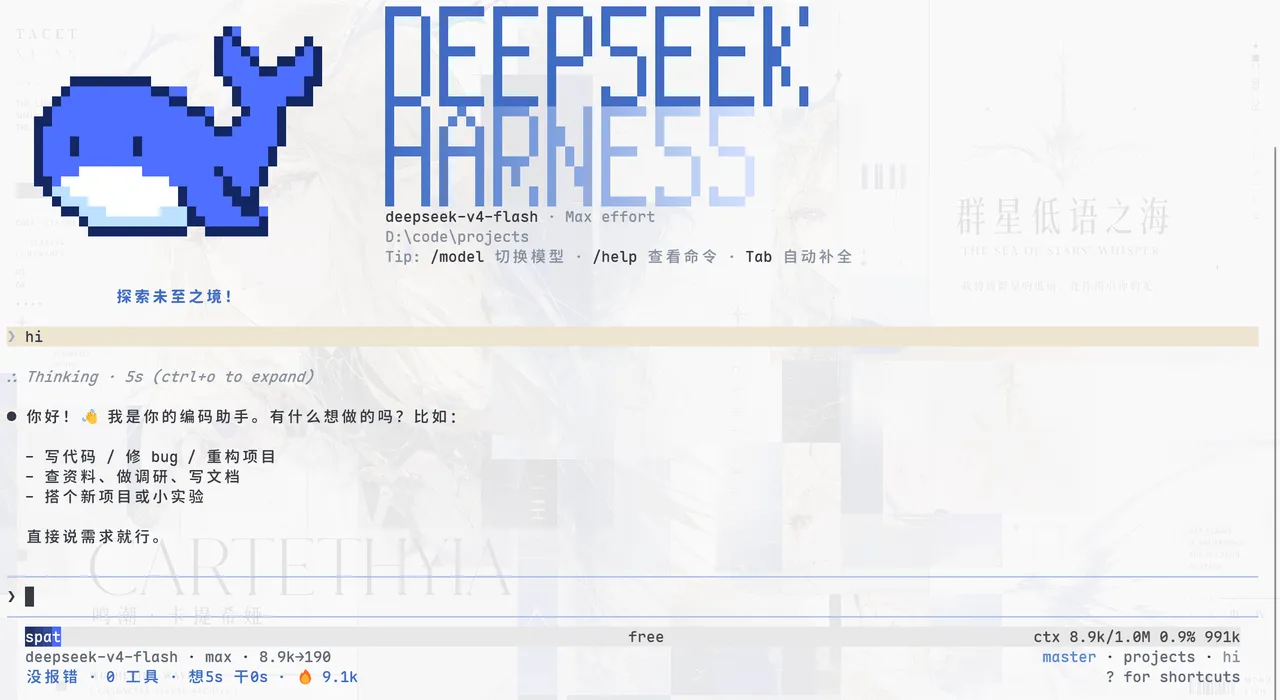
Give DSH a Claude Code-style face: a pixel whale top bar, streaming thoughts, and double-Esc time rewind — terminal lovers no longer have to envy anyone else’s setup.
What problem it solves
DSH’s default Web UI lives in the browser, which can feel like something is missing for users who prefer terminal textures, keyboard shortcuts, and observable state: seeing what the model is thinking, how much context is loaded, and where tokens go often means digging through logs or switching windows. This plugin fills that gap with a Claude Code-style TUI — a pixel whale top bar, a dual flowing-glow title, a real-time status line, streaming thought expansion, and a blue-white context progress bar plus a TPS gauge.
It sticks to “zero core changes, pure plugin mounting”: install to enable, and uninstalling leaves no core patches — which is why DeepSeek Harness’s official WeChat account featured it as a “selected beta-user plugin”. Interaction is terminal-native: streaming Markdown, structured tool cards, command and file completion, @ file references (completion anywhere in a message, images sent as persistent image blocks), history search, and message selection. For long sessions it uses event-driven projection, differential terminal output, and layout-level virtualization to cut per-frame cost from O(whole session) to O(visible window), so rendering and memory don’t grow without bound.
Key features
- Terminal-native interaction: streaming Markdown, structured tool cards, command and file completion,
@file references, history search, inline / alternate-screen rendering, and/langlanguage switching - Observable agent state: a real-time status line, context segment progress, TPS gauge, cache-hit rate, reasoning level, and token stats
- Double-Esc time rewind: double-tap Esc while idle to rewind/fork the session back to an earlier state
- Full session workflow:
/resume,/new,/compact,/export,/btwside questions, and/modelswitching - DSH capability wiring: Agent presets, Skills, MCP, Goals, Todos, subagents, and
ask_user_questionall connect through existing services or registries - Customizable look:
/themeswitching (auto / light / dark / dark-ansi, plus custom JSON themes) and/presetagent-preset switching
Quick start
Install the CLI and plugin globally, then launch the TUI: npm install -g @deepseek-ai/dsh @deepseek-harness-tui/dsh-tui followed by dsh-tui (dsh-tui --resume restores the last session). Once inside, common commands include /resume, /new, /compact, /export, /model, /preset, /theme, and /lang; press ? for the shortcut menu, double-tap Esc to rewind, use @ for file references, and Ctrl+V to paste images. Inside VS Code’s integrated terminal, the companion dsh-tui-vscode extension makes the experience nearly identical to the official Claude Code extension.
Who it is for
- Terminal lovers who want Claude Code-style interaction and observable state in DSH
- Heavy users of long sessions who need the context progress bar and TPS gauge to watch costs
- People who enjoy customizing themes, shortcuts, and agent presets
- Developers working in VS Code who want an experience close to the official Claude Code extension
Compiled from the project README · All rights belong to the original author
Report issue / Request removal