modlens
modlens helps DSH AI developers give text-only models image understanding: paste an image into chat and let the model read it.
Install
dsh plugin --profile web add @liustack/modlens Screenshots 5
modlens
Give a text-only model sight: paste an image straight into the chat and it reads like it can see.
What problem it solves
The flagship DeepSeek and GLM chat models are text-only and cannot read images. To “read” a screenshot, an error, or a chart mid-conversation, you usually switch to a multimodal model or save the image to a file and pass a path. ModLens makes it a straight paste: a plug-in vision engine that gives a text-only model sight, with no file-saving and no separate vision model or API key to configure.
It exposes a native modlens_read_image tool and auto-discovers every provider route carrying text-only DeepSeek or GLM models, adding a wrapped (modlens vision) entry per route (it remembers your pick, so once is enough). There are two paste routes: just paste (the image lands as a private temp file), or pick the (modlens vision) entry and paste (the thumbnail stays visible in your message, closer to the Codex feel); images are converted to structured evidence at request time and answered by the same underlying route.
Key features
- Paste-to-read: paste an image and it reads it — no saving to a file and passing a path first
- Native tool and routes: exposes
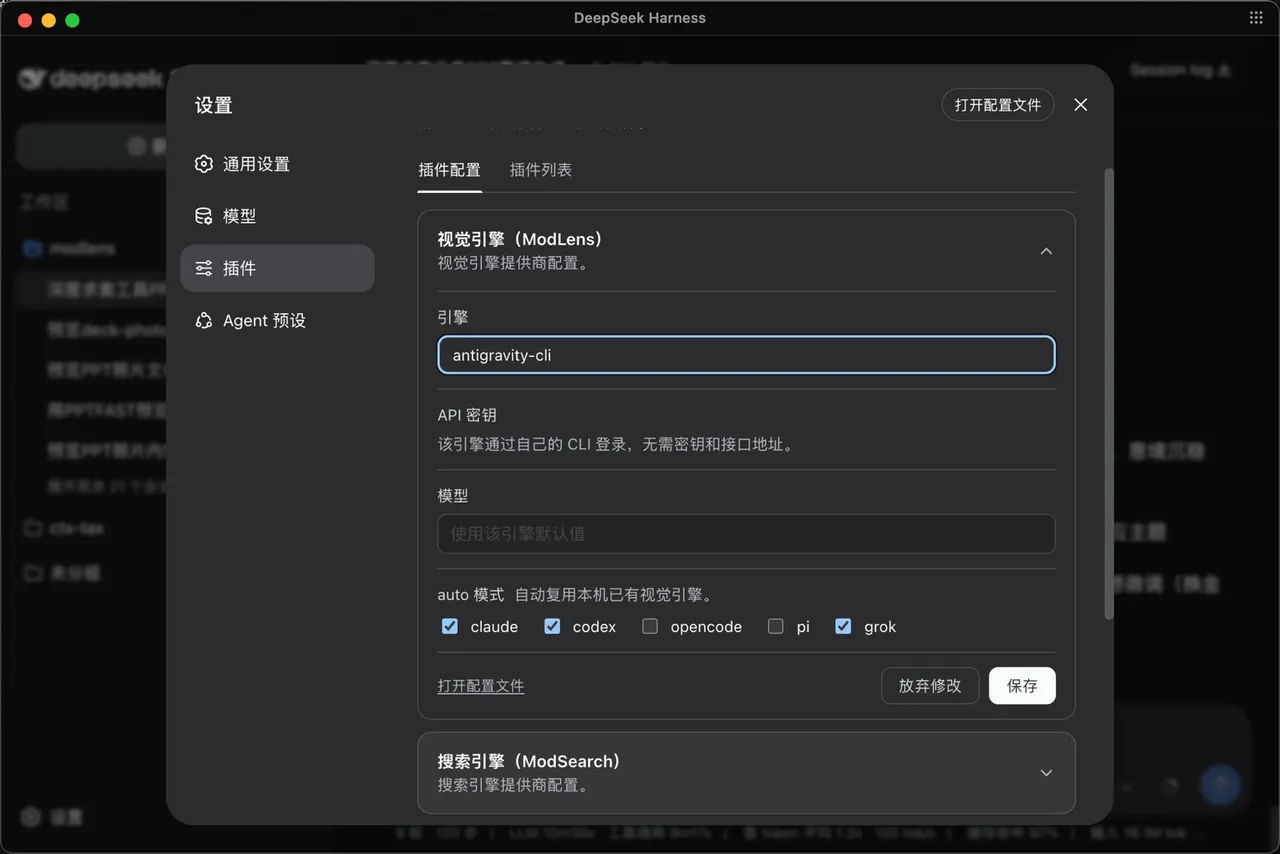
modlens_read_imageand adds a(modlens vision)entry per text-only DeepSeek / GLM route, automatically excluding vision models - Six built-in engines + failover: gemini-api, openai, anthropic, antigravity-cli, claude-cli, kimi-cli form one failover chain;
meta.attemptsrecords every try so fallback is never silent - Zero-config start: reuses the multimodal logins Claude Code, Codex, OpenCode, or Pi already have; with nothing set up, Antigravity CLI is a free no-key channel
- Evidence, not imagination: full transcription, reading-order layout regions, and entity / relation lists — the model quotes specifics
- openai as a universal socket: any OpenAI-compatible endpoint (qwen-vl, GLM, SiliconFlow, OpenRouter, self-hosted vLLM / Ollama) plugs straight in
Quick start
One command to install (the version is named explicitly so pnpm 11 resolves it correctly):
npx -y @deepseek-ai/dsh plugin —profile web add @liustack/modlens@3.22.0
After that, just chat: paste an image or drop a path and the skill triggers on its own — the image goes to a vision engine and the answer comes back grounded in what it read. Configure engines with modlens config set provider <name> (preference) or -p <name> (pin exactly one); behind a proxy set modlens config set proxy <url>.
Who it is for
- DSH users on text-only models who often need to read images (screenshots, errors, charts)
- Developers who don’t want to set up a separate vision model or API key just for image reading
- Users who want verifiable image answers that cite specific evidence rather than vague descriptions
Compiled from the project README · All rights belong to the original author
Report issue / Request removal