dsh-archived-chats
Developer tool for archived DSH chats: full-text search, organization, and ZIP backups
Install
dsh plugin --profile web add github:Ultroncn/dsh-archived-chats Writes to ~/.dsh/profiles/web; loaded by dsh web
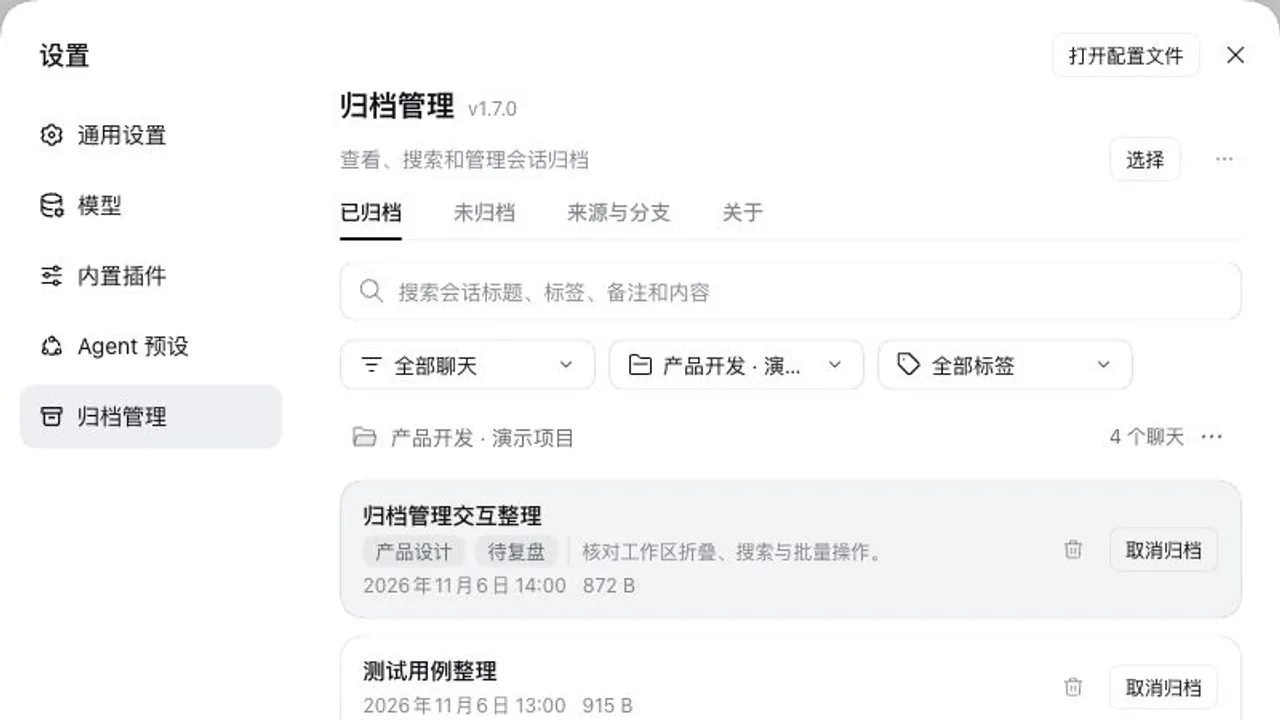
Screenshots 5
What it solves
DSH’s built-in archive only puts conversations away — after months of use, getting them back is painful. This plugin adds an archive center on top of the host’s official archive APIs:
- Scoped search: archived searches only archived, unarchived searches only unarchived, covering titles, message bodies and tool results (plus tags and notes for archived). Results show the matching turns with surrounding context and jump-to-message.
- Organization: group by workspace or ungrouped, multi-select bulk archiving, tags and notes.
- Backups: export/import JSON + Markdown ZIPs; imports are previewed first, existing conversation IDs are skipped and nothing is overwritten.
- Lineage: a read-only “origin and branches” view of how conversations were spawned, forked, and linked to sub-agents across all workspaces.
- About page: update checks, local dev build detection, copyable install info.
Caveats: version 2.0.6 removed the old restore and protection-snapshot actions, so deletion is permanent and irreversible (failed deletions are kept as retryable tasks). The submission blurb’s “Recycle Bin / restore” wording no longer matches the current release — trust the README, and export a backup before deleting. Backup ZIPs contain metadata and attachment references, not the attachment files themselves.
Who it’s for
- Developers who use DSH heavily over time and need to find past solutions by keyword.
- Users who want conversations organized by workspace, with tags and notes.
- Anyone who values local-first data and portable, periodic exports of their chat history.
Install
Search dsh-archived-chats (author Ultroncn) in the DSH plugin marketplace, or run dsh plugin --profile <your profile> add dsh-archived-chats@latest, then restart and open Settings → Archive Management. MIT licensed.
Compiled from the project README · All rights belong to the original author
Report issue / Request removal