dsh-workflow-lite
dsh-workflow-lite: DSH canvas workflow plugin—design flows, compile a plan prompt, no execution engine, for AI developers.
Install
dsh plugin --profile web add github:xiaoso456/dsh-workflow-lite Screenshots 3
What it solves
Running a multi-step task in DSH usually means packing the order of steps, the branches and the loop-backs into one long conversational prompt. The model improvises, and the flow is hard to inspect, reuse or share.
dsh-workflow-lite moves that onto a canvas:
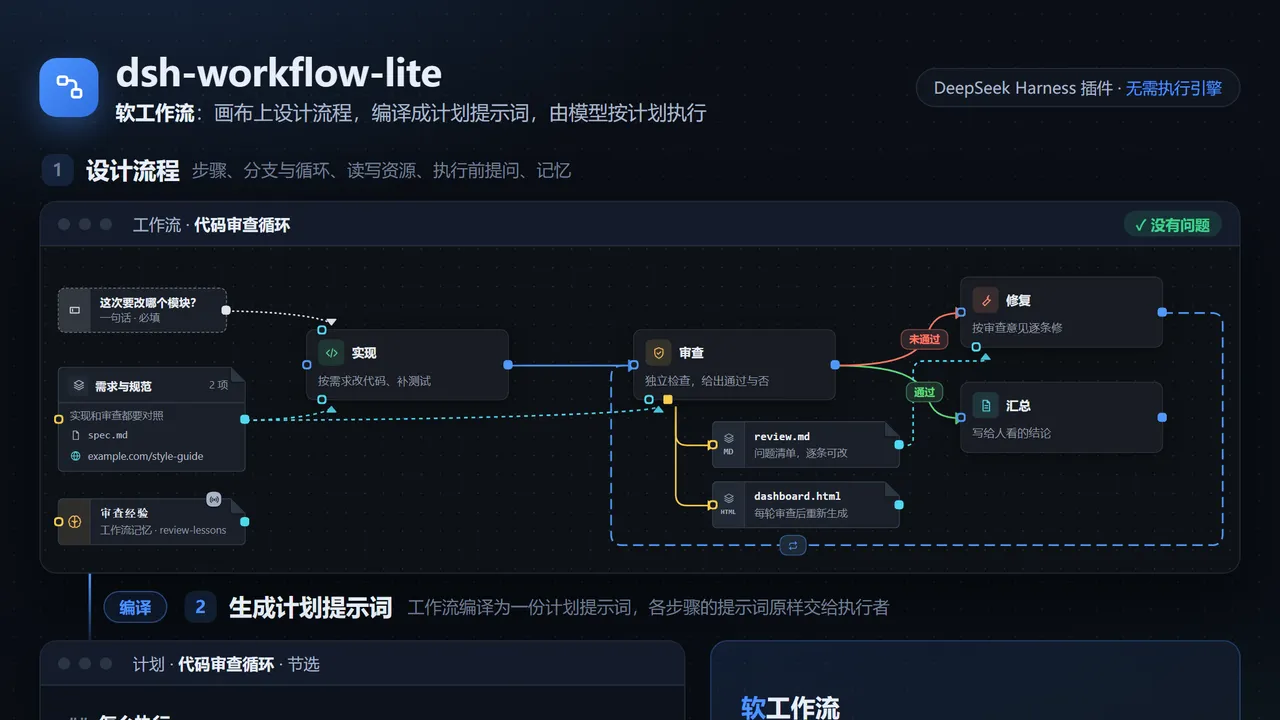
- Design — drag steps onto a canvas and wire them up. Edges can carry arbitrary conditions, covering sequential, parallel, join, conditional branch, loop and rollback structures. You can also just describe the flow in one sentence and let the model create or edit it, with the canvas syncing live.
- Compile — the plugin turns the workflow into a single plan prompt that spells out execution order, loop conditions, and each step’s inputs and outputs.
- Execute — the model in the current session decides how to carry it out (do it directly, dispatch sub-agents, form a team) and syncs progress back to the canvas.
The plugin ships no execution engine and needs no extra service; scheduling and judgement stay with the model.
Supporting features include binding files, folders, URLs or Skills as step resources; collecting required information from the user before a run; live run status with per-step summaries; saved versions with diffing; import/export of a workflow plus selected versions as a .wflite.zip; compiling a version into a standalone skill that works without the plugin; plus experimental canvas rendering (boards, images, documents, logs, tables) and workflow memory. Two path variables, {workflow} and {instance}, let resources be shared across workspaces while each run writes to its own output folder.
Who it’s for
- DSH users who want to turn a recurring multi-step process (“write code → review → roll back and fix if it fails, at most three rounds”) into a reusable asset;
- Developers who need to inspect a flow visually, version it, and share it with a team;
- Anyone who wants the model to follow a plan without maintaining a separate orchestration service or execution engine.
Install and use
Web (requires Node.js 22+):
dsh plugin --profile web add @xiaoso/dsh-workflow-lite
dsh web
Desktop: open Plugins in the sidebar → Add plugin → Install third-party plugin, enter @xiaoso/dsh-workflow-lite, install and restart DeepSeek Harness. A Workflow tab then appears at the top of the session page.
The README states support for DeepSeek Harness 0.2.0 and 0.2.1 (including their preview releases). Full documentation with screenshots: https://xiaoso456.github.io/dsh-workflow-lite/.
Caveats
- The author labels this experimental: features and data formats may still change incompatibly. “Workflow memory” is still being validated (early repeated-run tests showed no stable speed-up), and concurrent edits to the same memory are not locked.
- The README says MIT, but the repository license field reports NOASSERTION — check the license file before relying on it.
Compiled from the project README · All rights belong to the original author
Report issue / Request removal