dsh-connect
Bridge DSH agents into Feishu/Lark, DingTalk and Telegram — dispatch tasks in chat, watch streaming execution, get result summaries back.
0 MIT Author IvanWu2015 Updated
Install
dsh plugin --profile web add github:IvanWu2015/dsh-connect Screenshots 3
What it solves
DSH agents normally live in a terminal or the Web GUI, so once you step away from the desk you cannot hand off work or follow progress. dsh-connect plugs the agent into the chat platforms you already use (Feishu/Lark, DingTalk, Telegram) and turns the conversation into a remote front end:
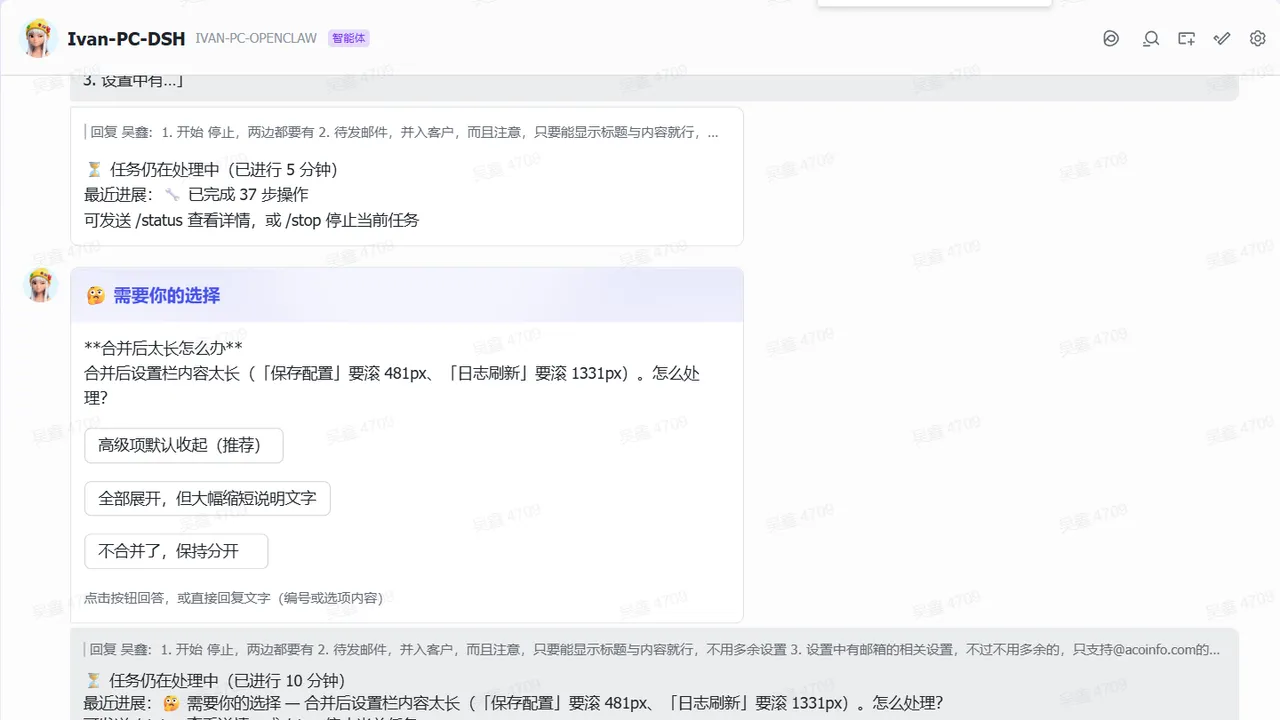
- Two-way conversation: chat messages go straight into the DSH agent and replies stream back as typewriter-style cards. Each DM or group is bound to a DSH
Sessionand automaticallyresumed after a process restart, preserving multi-turn context. - Long tasks without blind waiting: every task is acknowledged on receipt, while thinking, tool calls, questions and permission requests update live. A configurable watchdog (default 5 minutes, per chat) posts a standalone progress card when a turn goes quiet, and a task-end card reports model, input/output/cached tokens, step count, duration and context usage — with a
/compactsuggestion at ≥75% context. - Decisions inside the chat: when the agent asks a question (
ask_user_question) or requests a permission escalation, an interactive card with buttons appears in chat; tap a button or reply with the number/label — no need to open the Web GUI. - Notification levels:
full/important/result(answer only, the default), switchable per chat and persisted, so busy runs stay readable. - Configure without editing files:
/settingsopens a button menu for model, reasoning effort, notification level, progress interval, language and a config overview, all scoped per chat;/menuadds hierarchical point-and-click navigation. - Images and files: inbound images are downloaded and, if the main model lacks vision, described by a vision sub-task and injected; attachments/audio/video land in the workdir;
/send <path>returns a workspace file to the chat (images inline, other files as attachments). - Safety and ops: groups require @mention by default, user/chat allowlists, credentials via environment variables, config file or the DSH credential store (written from the settings pane, never echoed in clear);
/clearand/newask for confirmation;/remindschedules reminders without waking the agent or spending tokens and survives restarts;/broadcastreaches every bound chat. - One plugin, several platforms: the core
connectservice, the Feishu/Telegram/DingTalk adapters and the web-settings stack ship together behind a singlechannelsselector, so you enable only what you use.
Who it’s for
- Developers and operators who are often away from the desk and want to hand tasks to DSH and follow long runs from a phone chat app.
- Teams already collaborating in Feishu or DingTalk that want agent capability inside their existing group chats.
- Anyone who wants completion notices, scheduled reminders and permission confirmations delivered where they are already looking instead of in another window.
- Self-hosted / intranet users who care about controllability: allowlists, @mention gating, credential management and confirmation for destructive actions.
Tags Automation Tools
Compiled from the project README · All rights belong to the original author
Report issue / Request removal