dsh-better-sidebar
dsh-better-sidebar: service-based sidebar framework with ready-to-use workbench for files, terminal, Git, browser, sub-agents for DSH AI developers.
Install
dsh plugin --profile web add dsh-better-sidebar Screenshots 5
dsh-better-sidebar
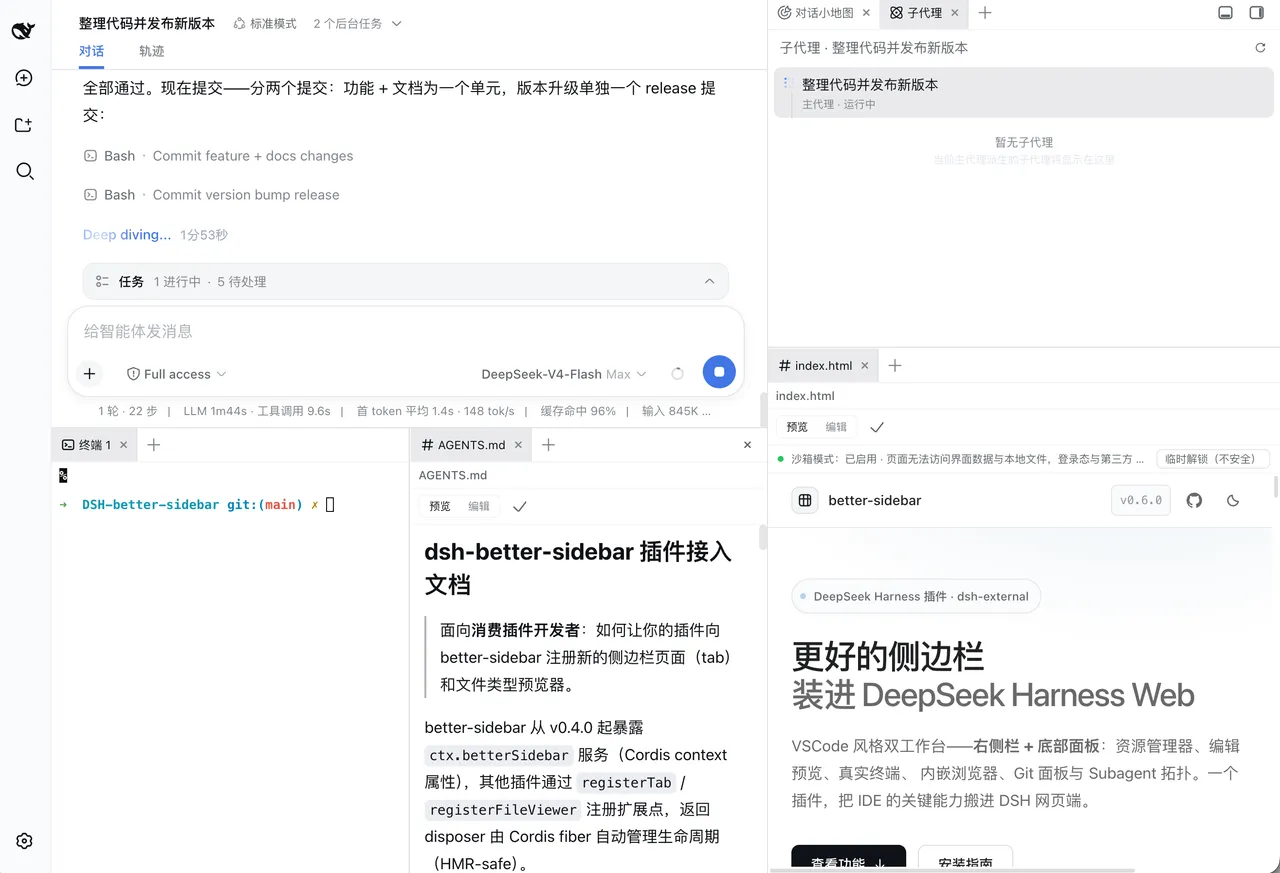
A workbench for DeepSeek Harness Web — files, terminal, Git, embedded browser, and sub-agents across a right sidebar and bottom panel, open for any plugin to extend.
What problem it solves
DeepSeek Harness Web’s native UI lacks a workbench for files and engineering tasks — reading files, running commands, checking Git, and watching background jobs usually means switching to another tool. This plugin provides a right-sidebar plus bottom-panel dual workbench: a file workbench (lazy-loaded tree + CodeMirror editor, inline previews for images / Markdown with Mermaid / HTML / PDF / Office), an embedded multi-tab browser running in sandboxed iframes with protocol-based external-link routing, a real terminal (xterm.js + node-pty with reconnect replay, optionally exposing terminal_* tools to the model), a Git panel with real diffs and VSCode-style diff tabs, and a background-task page with subagent topology.
More importantly, it opens the ctx.betterSidebar service to every plugin — the built-in 7 tabs and 6 file viewers register through the same registerTab / registerFileViewer API as third-party plugins, with full parity. Features the project no longer ships itself are left to the ecosystem. Layout, tabs, and panels persist per session, and mobile collapses into a full-width drawer.
Key features
- File workbench: lazy-loaded tree + CodeMirror editor with inline previews for images / Markdown (with Mermaid) / HTML / PDF / Office
- Embedded browser: multi-tab with back/forward/refresh, sandboxed iframes, external links split by protocol (HTTP in the sidebar, HTTPS to the system browser)
- Real terminal: xterm.js + node-pty shell with reconnect replay; optionally exposes
terminal_*tools to the model - Git panel: real diffs and VSCode-style diff tabs, history, right-click stage / commit / revert
- Background-task page: subagent topology plus exit codes / live output / force kill
- Dual workbench: right sidebar + bottom panel; drag tabs to split/merge panes (even across panels), mobile collapses to a full-width drawer
- Service-based base:
ctx.betterSidebarplusregisterTab/registerFileViewer, with third-party parity to built-ins - On-demand loading: ~325KB core at startup; terminal / editor / Mermaid chunks load only when used
Quick start
Install:
dsh plugin --profile web add dsh-better-sidebar@latestHard-refresh the browser (Cmd/Ctrl+Shift+R) and the sidebar appears — client changes hot-load, so no restart is needed unless the host half updates. Prereq: Node.js ≥ 20 and pnpm ≥ 10. Shortcuts include Ctrl/Cmd + S to save, Ctrl + Enter to commit in Git, middle-click to close a tab, and dragging a tab to a pane edge to split/merge.
Plugin authors can inject the betterSidebar service and register new sidebar pages and file viewers with registerTab / registerFileViewer.
Who it is for
- Users who want to manage files, run a terminal, and watch Git and sub-agent state directly in the DSH UI
- Plugin authors who want to add sidebar pages to DSH by reusing the
ctx.betterSidebarservice - Heavy DSH users who want files, terminal, browser, and Git unified in one workbench
Compiled from the project README · All rights belong to the original author
Report issue / Request removal