dsh-cost-meter
dsh-cost-meter: a DSH developer session cost & quota dashboard — live spend, budgets, balances and Coding Plan quotas at a glance
350 MIT Author Han-1413141 Updated
Install
dsh plugin --profile web add github:Han-1413141/dsh-cost-meter Screenshots 5
What it solves
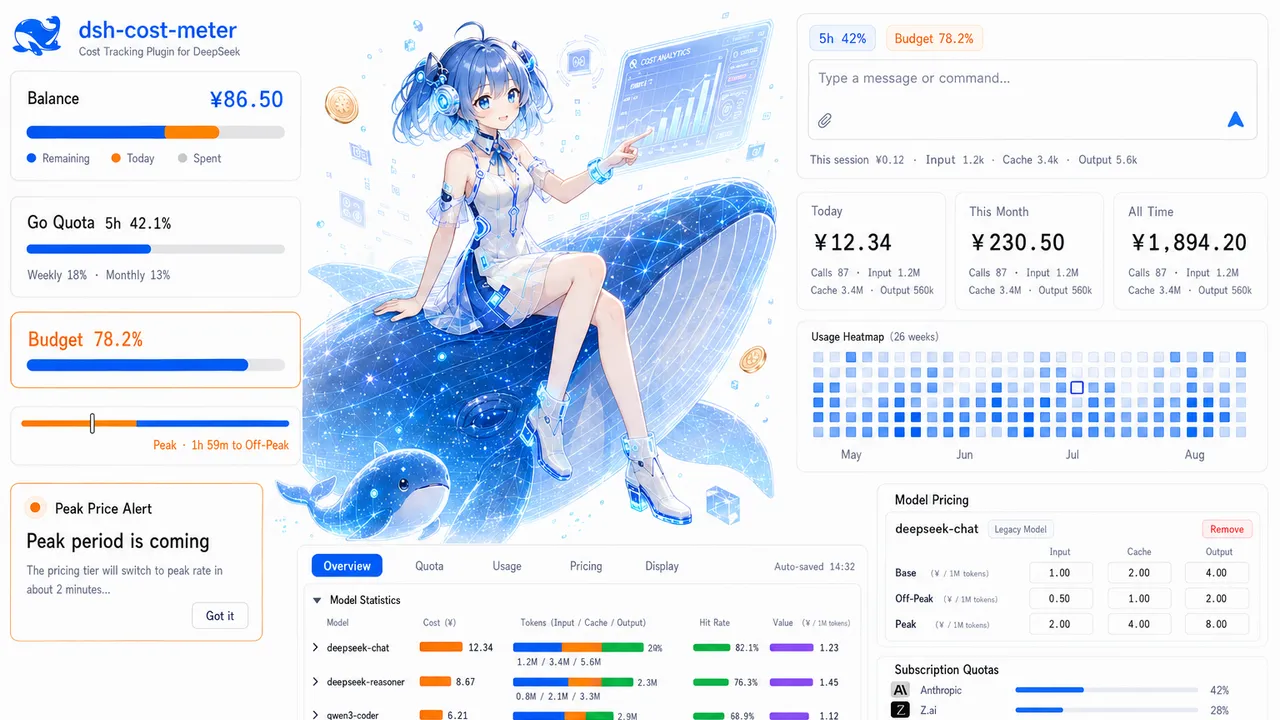
- Invisible spend: shows live per-conversation cost, input/cache/output tokens and cache hit rate inside the DSH web GUI, plus today, this-month and cumulative totals.
- Quotas scattered across providers: one place for the official balance, custom-provider balances and OpenCode Go / Anthropic / Z.ai / MiniMax / Kimi / OpenRouter / SiliconFlow / CommandCode / SCNet coding-plan quotas, with subscription quota and pay-as-you-go money kept separate.
- Budget drift: a budget box with used percentage, progress bar and today’s share of budget, warning at ≥80% and over-budget at ≥100%.
- Forgotten peak/off-peak switches: shows the UTC peak windows (01:00–04:00, 06:00–10:00) and the current tier, with pre-switch popup / system-notification alerts and one-click price sync from the official docs.
- Missing pre-install history: the first launch replays host session logs to rebuild costs from before the plugin was installed (idempotent, never double-counts live metering).
Who it’s for
- DSH users who care about API spend and want a budget for a session or a month.
- Developers mixing the official API with several subscription coding plans or gateway providers, who need subscription quota and real money separated.
- Heavy users and small teams who want to review usage and cost by model and by day.
Highlights
- Per-conversation / daily / cumulative cost cards, a 90+ model price catalog with auto-matching, editable peak and off-peak prices.
- Official balance and custom-provider balance (configurable extraction rules: dot path / number / add / subtract / divide) with an optional three-segment progress bar.
- Coding-plan quota queries with per-window toggles; a quota strip above the input box merges budget / Go / plan windows and refreshes on click.
- Codex-style 26-week token heat grid, today’s session breakdown, and history with configurable retention.
- Compact sidebar mode, configurable display positions, bilingual (zh/en) UI.
Install and docs
MIT licensed, published on npm as dsh-cost-meter. The README covers installation (including pnpm and PATH notes for macOS/Linux) and every setting, with additional topic guides and release notes under docs/.
Tags Tools DevTools
Compiled from the project README · All rights belong to the original author
Report issue / Request removal