dsh-Go
dsh-Go: DeepSeek Harness for AI developers — run DSH on Android, or remotely drive DSH sessions on your computer.
23.2k AGPL-3.0 Author ccch1mneyyy Updated
Install
Requires Android 8 or later. Most phones use the arm64 APK. On first launch, choose to run DSH on your phone or connect to DSH on a computer.
Screenshots 5
What it solves
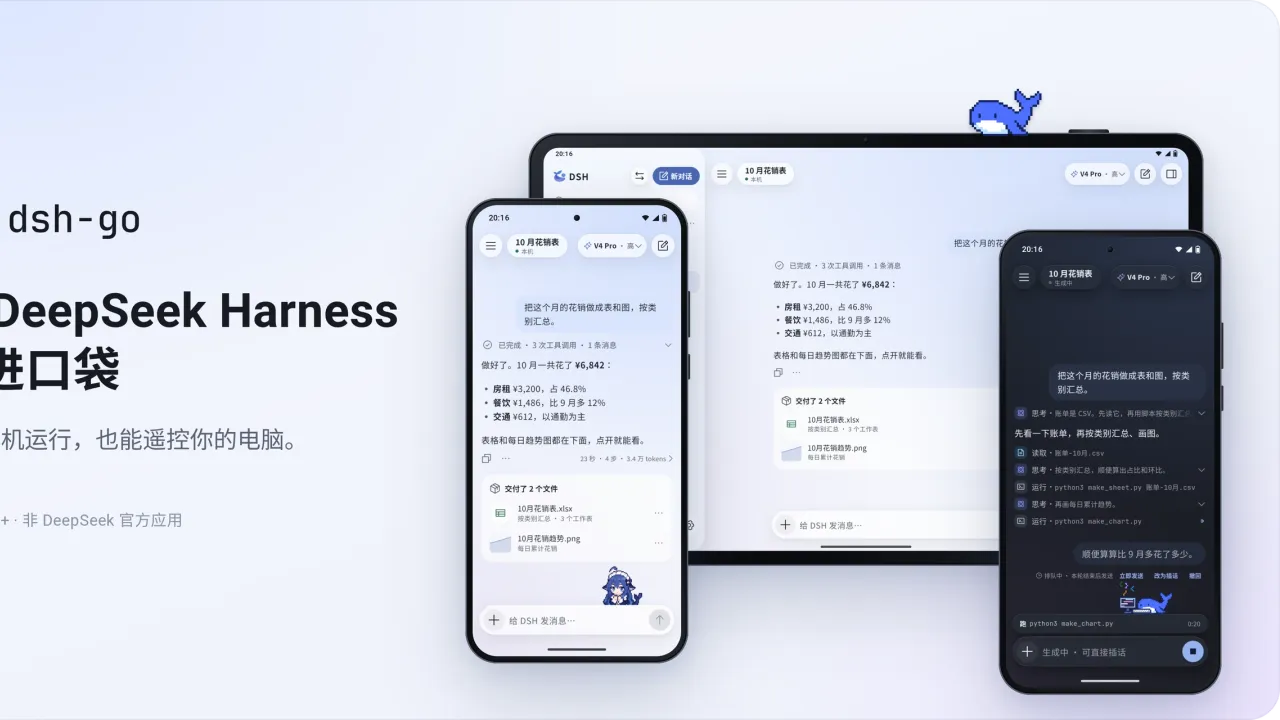
- Actually running DSH on a phone: the app installs Ubuntu, Node.js and the DSH runtime inside itself — no root, no separate Termux install. You can work without carrying a laptop.
- Continuing from your desktop setup: connect to your own machine or server over SSH or DSH Remote, and switch between local and remote hosts in one tap.
- Mobile-first interaction: interject while a reply is still streaming, push queued messages with “send now”, and let finished tool work collapse into a single line; toggle between the native UI and the web UI while staying on the same conversation.
- Sharing and looks: turn a reply into a share card, publish a whole conversation as an end-to-end encrypted replay link; six theme colors, four launcher icons, landscape/tablet re-layout, and Deepy/whale-girl desktop pets.
- For plugin developers: a native tool-card, form and panel SDK tailored to DSH Go, with tutorials and examples.
- Optional phone control: after granting permissions the local engine can read the screen, tap and type, with three confirmation levels; payments, passwords and verification codes always stay with you.
Who it’s for
- Individuals who want DSH with them on an Android phone throughout the day;
- People who want to remote-control DSH running on a home PC or server;
- Developers building mobile plugin UIs for the DSH ecosystem.
Requirements and known limits
- Android 8.0 (API 26)+, installed by sideloading an APK (this is not a Google Play release configuration); pick the arm64 build for typical phones — there is no 32-bit ARM build. Early test builds with a different signature must be uninstalled first.
- If you only connect to a remote host, no local runtime is needed on the phone. Phone control applies only to the local engine in normal mode and requires granting accessibility and related permissions; the “do not disturb” mode additionally needs Android 14+ plus Shizuku or self-connected ADB.
- DSH Remote currently supports image attachments only, cannot open the web UI inside the app, limits plugin management to on/off toggles, and does not support DS Bot or conversation-log export.
- Model requests go to the provider you configure; with phone control enabled, on-screen text (and screenshots for vision-capable models) may be sent to the model. Anonymous usage statistics are on by default and can be turned off in Settings → Privacy & Sharing.
- Licensed AGPL-3.0. This is a third-party client for DeepSeek Harness, not an official release.
Tags Agent DevTools
Compiled from the project README · All rights belong to the original author
Report issue / Request removal